Git
gpg
Telling Git about your signing key
Configure
(
  git config --global user.email "[email protected]"
  git config --global user.name "nιcнolaѕ wιlde"
  git config --global init.defaultBranch main
  git config --global user.signingkey 69FF3D02ABFCD01F328778D5374FA199233281E4
  git config --global commit.gpgsign true
  git config --global pull.rebase false
)
Usage
Switching Remote URLs
git remote -v
origin  [email protected]:USERNAME/REPOSITORY.git (fetch)
origin  [email protected]:USERNAME/REPOSITORY.git (push)
git remote set-url origin https://github.com/USERNAME/REPOSITORY.git
Syncing a Fork
# Configuring a remote for a fork if it doesn't already exist
git remote add upstream https://github.com/ORIGINAL_OWNER/ORIGINAL_REPOSITORY.git
git fetch upstream
git checkout main
git merge upstream/main
# Push the changes
git push origin main
Edit Remote Branch
In both cases, start by fetching from the remote repository to make sure you have all the latest changes downloaded.
This will fetch all of the remote branches for you. You can see the branches available for checkout with:
The branches that start with remotes/* can be thought of as read only copies of the remote branches. To work on a branch you need to create a local branch from it. This is done with the Git command switch (since Git 2.23) by giving it the name of the remote branch (minus the remote name):
In this case Git is guessing (can be disabled with --no-guess) that you are trying to checkout and track the remote branch with the same name.
Different Path
Empty Message
Change a Commit Message
List Commits
URLs
-
Commit: https://github.com/python/cpython/archive/31af650.tar.gz
-
Release Source: https://github.com/nicholaswilde/helm-charts/archive/wikijs-0.1.6.tar.gz
gh
No Message
Synchronizing a local Git repository with a remote one
git fetch --prune
# https://stackoverflow.com/a/17029936/1061279
git branch -r | awk '{print $1}' | egrep -v -f /dev/fd/0 <(git branch -vv | grep origin) | awk '{print $1}' | xargs git branch -d
Deleting Remote Branch
Rename Branch
Restore a File From Remote
Reset last commit
Reset last two commits
Delete Github Tag
Unstage file that has been added but not commited
Get Latest Version
Strips v and release prefixes
curl -sX GET "https://api.github.com/repos/Jackett/Jackett/releases/latest" | jq --raw-output '.tag_name'
version="${version#*v}"
version="${version#*release-}"
Get Latest Commit
Get's the first 7 characters of commit.
curl -sX GET https://api.github.com/repos/seejohnrun/haste-server/commits/master | jq --raw-output '. | .sha'
version="${version#*v}"
version="${version#*release-}"
version="${version:0:7}"
Ignore Modified Files
# dir
git update-index --assume-unchanged dir-im-removing/
# or a specific file
git update-index --assume-unchanged config/database.yml
# To get undo/show dir's/files that are set to assume-unchanged run this:
git update-index --no-assume-unchanged <file>
# To get a list of dir's/files that are assume-unchanged run this:
git ls-files -v|grep '^h'
Push Tags
Push commit and tags at the same time
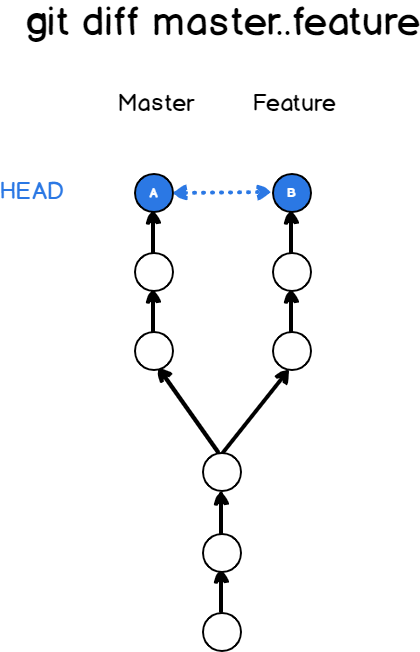
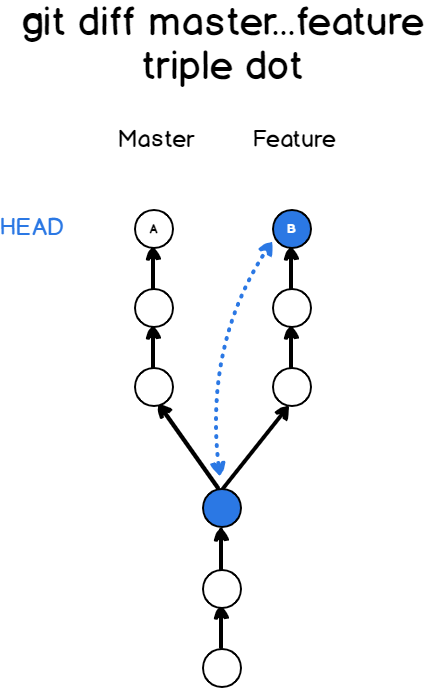
Compare Two Branches
Add File After Commit
Use a Specific SSH Key
One Time Use
git -c "core.sshCommand=ssh -i ~/.ssh/id_ed25519" clone [email protected]:nicholaswilde/dotfiles.git